Graphite features
The current alpha version of Graphite is a tool for vector art and graphic design. It also supports a limited, experimental raster editing toolset. This tooling is built around a procedural graphics engine, letting artists build complex graphics and animations in its visual scripting language.


Layers & nodes: hybrid editing
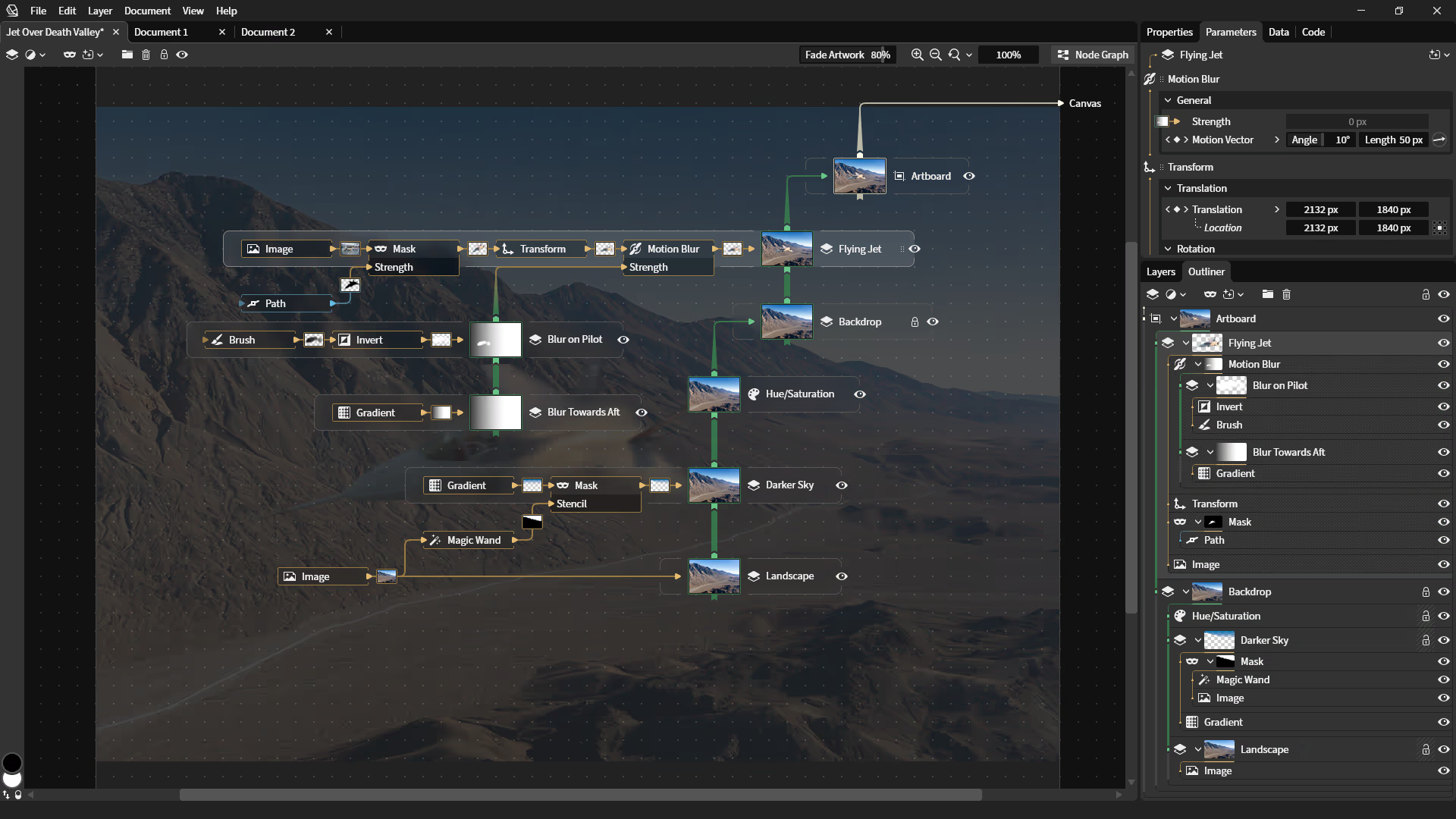
Graphite combines the best ideas from multiple categories of digital content creation software to reimagine the workflows of 2D graphics editing. It is influenced by the core editing experience of traditional layer-based raster and vector tools, the nondestructive approaches of VFX compositing programs used by film studios, and the boundless creative possibilities of procedural production tools daily-driven by the 3D industry.
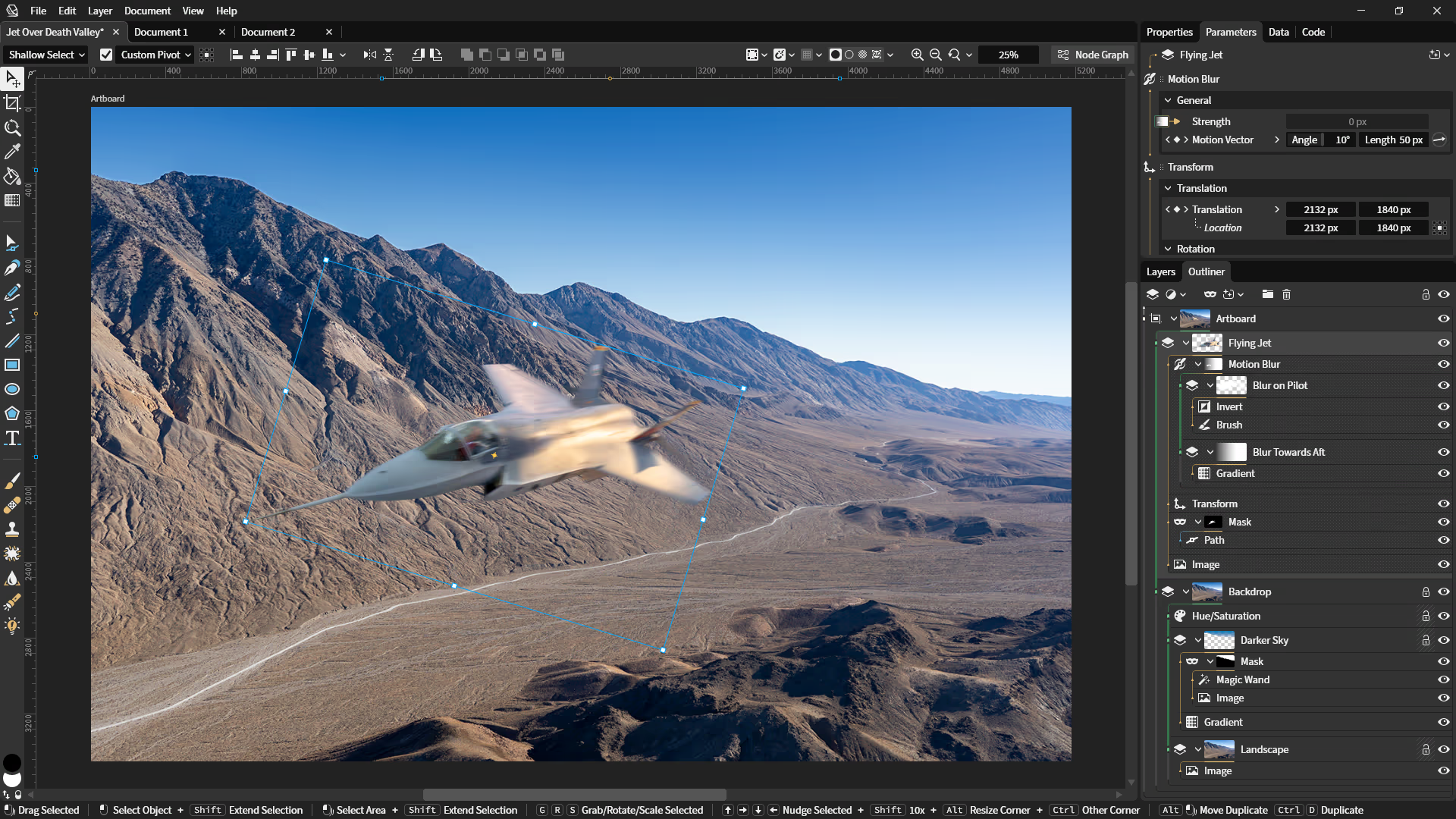
Classic layer-based image editing is easy to understand, employing collapsable folders that help artists stay organized. A variety of interactive viewport tools make it easy to manipulate the layers by drawing directly onto the canvas. On the other hand, node-based editing is essentially artist-friendly programming. It works by describing manipulations as steps in a flowchart, which is vastly more powerful but comes with added complexity.
The hybrid workflow pioneered by Graphite is able to deliver a classic tool-centric, layer-based editing experience built around a procedural, node-based compositor. Users can ignore the node graph, use it exclusively, or switch back and forth with the press of a button while creating content. Interacting with the canvas using tools will manipulate the nodes behind the scenes. And the layer panel and node graph provide two equivalent, interchangeable views of the same document structure.
Raster & vector: sharp at all sizes
Digital 2D art commonly takes two forms. Raster artwork is made out of pixels which means it can look like anything imaginable, but it becomes blurry or pixelated when upscaling to a higher resolution. Vector artwork is made out of curved shapes which is perfect for some art styles but limiting to others. The magic of vector is that its mathematically-described curves can be enlarged to any size and remain crisp.
Other apps commonly focus on just raster or vector, forcing artists to buy and learn separate products for both. Mixing art styles requires shuttling content back and forth between programs. And since picking a raster document resolution is a one-time commitment, artists often choose to start out big, resulting in sluggish editing performance and multi-gigabyte documents.
Graphite reinvents raster rendering so it stays sharp at any scale. Artwork is treated as data, not pixels, and is always redrawn at the current viewing resolution. Zoom the viewport and export images at any size— the document's paint brushes, masks, filters, and effects will always be rendered in full detail.
Marrying vector and raster under one roof enables both art forms to complement each other in one cohesive creative workflow. (Scalable raster compositing is still experimental.)
Roadmap
 Editor systems; basic vector art toolsBetter tools; node graph prototypingNode graph integration in documentsProcedural vector editing and usabilityPerformance, animation, desktop RC1More robust path boolean operationsBlend tool to morph between shapesRichly-styled tooltips and UI polishCustom attributes for list dataVector mesh editing and renderingDockable panels and tab reorderingOffline caching and installable PWAEmbedded resource managementItem/list graph data flow ergonomicsStable document formatImproved imaging model data formatNew and improved brush toolStylus drawing with pressure and tiltDesktop app release candidates RC2-6Physical measurement unitsContext menus throughout the editorLocal fonts accessPer-glyph text style controlsText-on-path tool supportTimeline panel for animation curvesColor palette panelGPU-accelerated raster renderingNondestructive shape builder toolVector path editing UX polishSimplified main properties panelAutomatic image trace vectorizationBasic support for PDF exportDesktop app release and 1.0 launchSigned distance field renderingBroader SVG support including filtersSelection tools and marquee maskingRaster adjustments, filters, and effectsLiquify and warp transformsVariables and live color swatchesCode editor for custom nodesNode version managementNested documents as custom nodesSaving over local files (web version)Advanced typesetting featuresCMYK, spot color, and ICC profilesHDR and WCG color handlingParametric art standalone exportCommand paletteDocument history managementOffline edit resolution with CRDTsHistory brush and clone stamp toolsOnion skinning mode for animationAnimatable deformation meshes/rigsReal-time interaction persistenceMIDI and audio-reactive visualizationSimulation domainsProcedural PBR material generationRaw photo processingProcedural styling of paint brushesAsset libraries and node marketplaceAutomation/batch processing toolsMultiple adjacent document panelsTear-out panels as separate windowsMultiplayer collaborative editingInternationalization and accessibilityImport: PDF, EPS, AI, DXF, PSD, TIFFOutliner panel (node graph tree view)Neural nodes/tools like Magic WandInfinite generative vector patternsGeometric constraint system solverResponsive design layout solverAuthoring animated SVGs, Lottie, etc.Tracking, keying, and rotoscoping toolsLive video stream compositingTablet app and keyboard-free controlsMedia collection manager/browserCloud document storage/device syncPredictive graph rendering/cachingMulti-device distributed renderingHosted rendering accelerator service…and that's all just the beginning…
Roadmap spotlight: keyframe animation
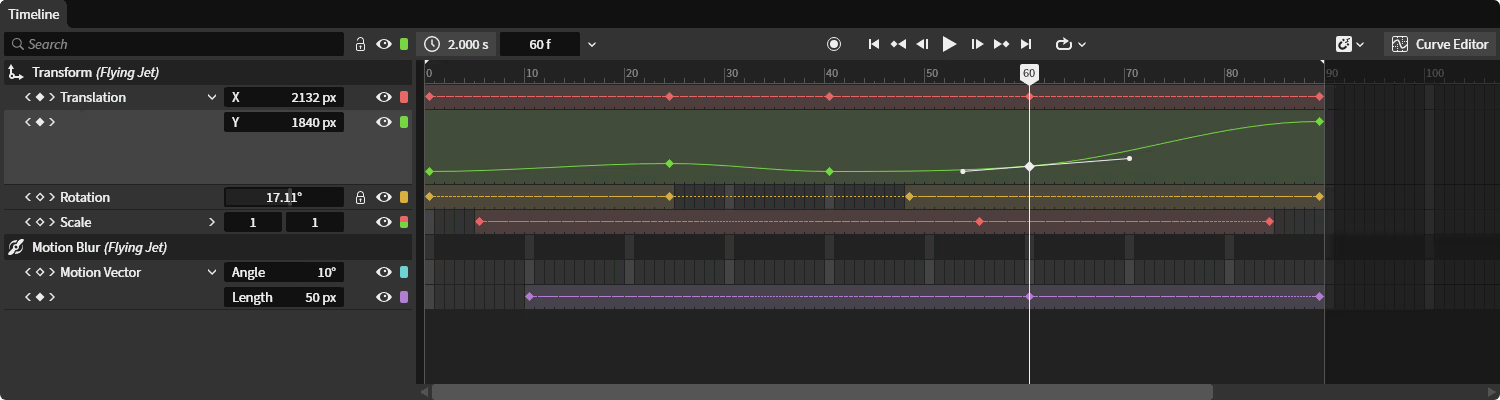
Coming late 2026, Graphite will expand its animation toolset beyond parametrically-driven motion to include traditional keyframe animation. The Timeline panel pictured below will let animators drive parameters using keyframes and curves through a traditional dopesheet interface.
Node parameters can be set to a constant value in the Properties panel, exposed to the graph for procedural animation, or exposed to a channel in the upcoming Timeline panel for hand-authored keyframing.
The panel will enable users to scrub through time with the playhead and choose between timing with discrete frames or continuous seconds. A dedicated curves editing mode (not pictured) will enable fine-tuning parameters with a labeled Y-axis, while the dopesheet allows individual channels to be expanded to view and edit the shape and smoothness of curves inline.
Work-in-progress design mockup:
Roadmap spotlight: raster image editing
The vision since Graphite's inception has been to open up the traditional raster image editing workflow to the greater degree of flexibility found in node-based compositors, without one approach compromising the ergonomics of the other.
As with Graphite's current vector toolset, raster editing will interpret the user's interactive edits as modifications to the construction of layers in the underlying node graph rather than destructive alterations to layer pixel data (as in other image editors). By containing only a description of the user's editing operations without the data, documents will remain ultra tiny when source assets are linked externally.
Brushes, selection tools, masks, filters, effects, adjustment layers, and other tools used to manipulate raster layers will all be presented in a familiar form when Graphite's raster toolset nears maturity by the end of beta.
Work-in-progress design mockup: